
Facebook/Meta Consent Mode
|
Applies to: WordPress Plugin + Admin Portal WP Admin: Protection tab > Consent Modes (Professional plan)
|
Facebook/Meta Consent Mode makes the Meta Pixel align with a visitor’s consent. Before consent, the Pixel is held in a revoked state; once consent is given for the relevant purpose, it upgrades automatically—so what runs matches the user’s actual choice. Cookie Compliance integrates this without custom coding.
Pro plan required. Facebook/Meta Consent Mode is available on the Professional plan only. Basic plan users will see an upgrade prompt when accessing this setting.
What it does
- Uses Meta’s consent API to keep the Pixel revoked by default and grant only after consent.
- Maps a visitor’s selection to your Purpose Categories and Access Levels. In practice:
- Private → only Basic Operations; Meta Pixel remains revoked.
- Balanced → Site Optimization allowed; Ad Personalization not allowed → Meta Pixel remains revoked.
-
Personalized → Ad Personalization accepted → Meta Pixel granted and can run.
This keeps marketing/personalization signals off until they’re explicitly allowed.
Implementation
Step 1 — Place the Pixel below the Cookie Compliance script
Add Meta’s standard Pixel code in your site header, anywhere under the Cookie Compliance script. You do not have to edit the Pixel code itself for this integration.
Example:
<!-- Facebook Pixel Code -->
<script>
  !function(f,b,e,v,n,t,s)
  {if(f.fbq)return;n=f.fbq=function(){n.callMethod?
  n.callMethod.apply(n,arguments):n.queue.push(arguments)};
  if(!f._fbq)f._fbq=n;n.push=n;n.loaded=!0;n.version='2.0';
  n.queue=[];t=b.createElement(e);t.async=!0;
  t.src=v;s=b.getElementsByTagName(e)[0];
  s.parentNode.insertBefore(t,s)}(window, document,'script',
  'https://connect.facebook.net/en_US/fbevents.js');
  fbq('init', '{your-pixel-id-goes-here}');
  fbq('track', 'PageView');
</script>
Step 2 — Enable Facebook Consent Mode in the WordPress admin
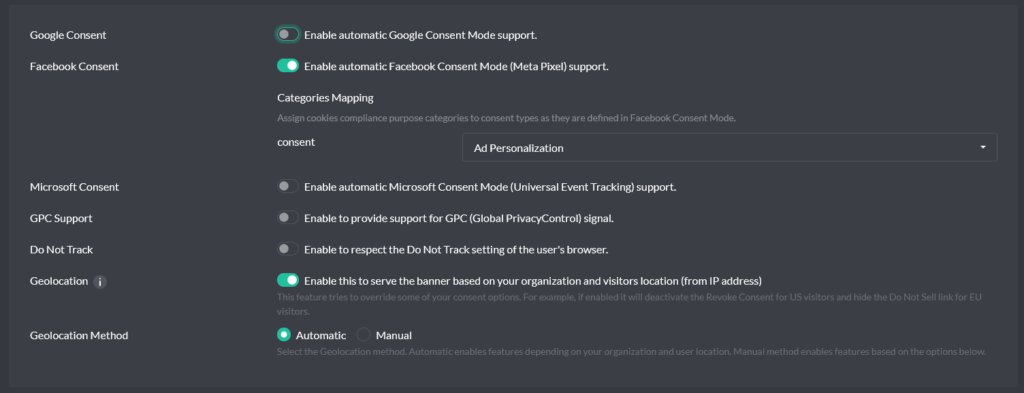
In WordPress admin, open the Compliance by Hu-manity.co plugin, go to the Protection tab, click Consent Modes, select Facebook, enable it and click Apply. This requires a Pro plan.
From then on, the banner will signal Meta’s consent API on the visitor’s behalf—revoked before consent and granted when the accepted purposes include Ad Personalization (e.g., the Personalized level).
Under the hood (for accuracy): Meta supports
fbq('consent', 'revoke')andfbq('consent', 'grant'); Cookie Compliance drives those states based on the user’s choice.
Scope & expectations
- The behavior above applies to the Meta Pixel on web. If you also send events server-side (Conversions API), apply the same consent state to those events so server traffic doesn’t bypass the user’s choice.
- If a user later changes their preference (via the revoke option), Cookie Compliance updates the Meta consent state accordingly.
- This integration doesn’t alter your event schema; it only controls whether the Pixel can operate based on consent.
Verification
- Before consent (or under Private/Balanced), your Network tab should not show Meta Pixel requests initiated by granted consent.
- After choosing Personalized (accepting Ad Personalization), the Pixel initializes and can send events as configured.
Terminology
- Purpose Categories — the why behind a service (e.g., Site Optimization, Ad Personalization).
- Access Levels — visitor-friendly presets over those purposes (Private, Balanced, Personalized).
- Grant/Revoke — Meta’s consent API states for the Pixel (
fbq('consent','grant'|'revoke')).