
Global Privacy Control (GPC)
|
Applies to: WordPress Plugin + dashboard WP Admin: Cookie Consent tab > Laws, languages & signals > Consent signals
|
Global Privacy Control (GPC) is a browser signal indicating the visitor’s preference to opt out of sale/sharing and similar tracking. When you enable GPC support in Cookie Compliance, the signal is honored before any interaction: the session starts in a protected state where all non-essential purposes are held off. By default the visitor sees no consent banner: Cookie Compliance records a Private choice for them and shows a brief notice (Show passive notice; Silent (no notice) shows nothing). If you choose Show full banner, the banner still appears and the visitor can choose Private, Balanced, or Personalized—but until they make a choice, non-essential scripts stay held.
Why GPC Matters
In the context of privacy regulations, GPC is particularly relevant under:
California Privacy Laws (CCPA/CPRA)
The CPRA (California Privacy Rights Act) explicitly states that businesses must honor a user-enabled Global Privacy Control. Ignoring GPC when it is enabled can be considered a violation of the law.
EU GDPR (General Data Protection Regulation)
While not officially recognized under GDPR yet, GPC aligns with GDPR’s principles of consent and data minimization. It could, in the future, be interpreted as a signal of consent refusal, especially if implemented in a clear and informed manner.
Other US State Privacy Laws
Some laws (e.g., Colorado Privacy Act, Connecticut Data Privacy Act) will require businesses to honor universal opt-out mechanisms, which could include GPC.
How it fits with Purpose Categories and Access Levels
GPC is not a geofence and not consent by itself; it’s a preference signal. It acts before any user interaction and narrows what’s allowed by default:
- Purpose Categories — GPC pushes Ad Personalization (and any categories you associate with sale/sharing or cross-site tracking) to off by default. Basic Operations stay on; Site Optimization and Content Personalization are held off too.
- Access Levels — The visitor can still choose Private, Balanced, or Personalized. With GPC present, none of these runs until the visitor makes a choice. (In Show full banner mode, if Consent on Scroll, Click or Close is on, scrolling, clicking or closing the banner saves the preselected Default Consent Level as that choice. This applies to the Classic engine; the New engine preselects nothing.) Limits apply: a script that an already-allowed script adds later (for example a tag fired by GTM while Google Consent Mode lets GTM run) is not held; on the Free plan blocking stops once the site passes its visit limit for the current cycle; a script that matches no built-in or custom pattern runs; and Cookie Compliance does not produce a cookie list for your cookie policy.
This keeps the model simple: GPC sets the guardrails; the visitor’s selection makes the final call within those guardrails.
Enable GPC support
Plan availability: Turning GPC on requires the Professional plan. A Free site that already has GPC on can still edit it. Turning it off on Free means it cannot be turned back on without Professional. A Free site that does not already have it on cannot enable it. In WordPress the editor is the Consent Signals panel (Cookie Consent → Laws, languages & signals → Consent signals), not the GPC support card on the Cookie Consent tab. When the control is locked, that row and the card show Upgrade to Pro. On Configuration → Consent Signals the same lock shows as a disabled GPC Support toggle with a PRO badge.
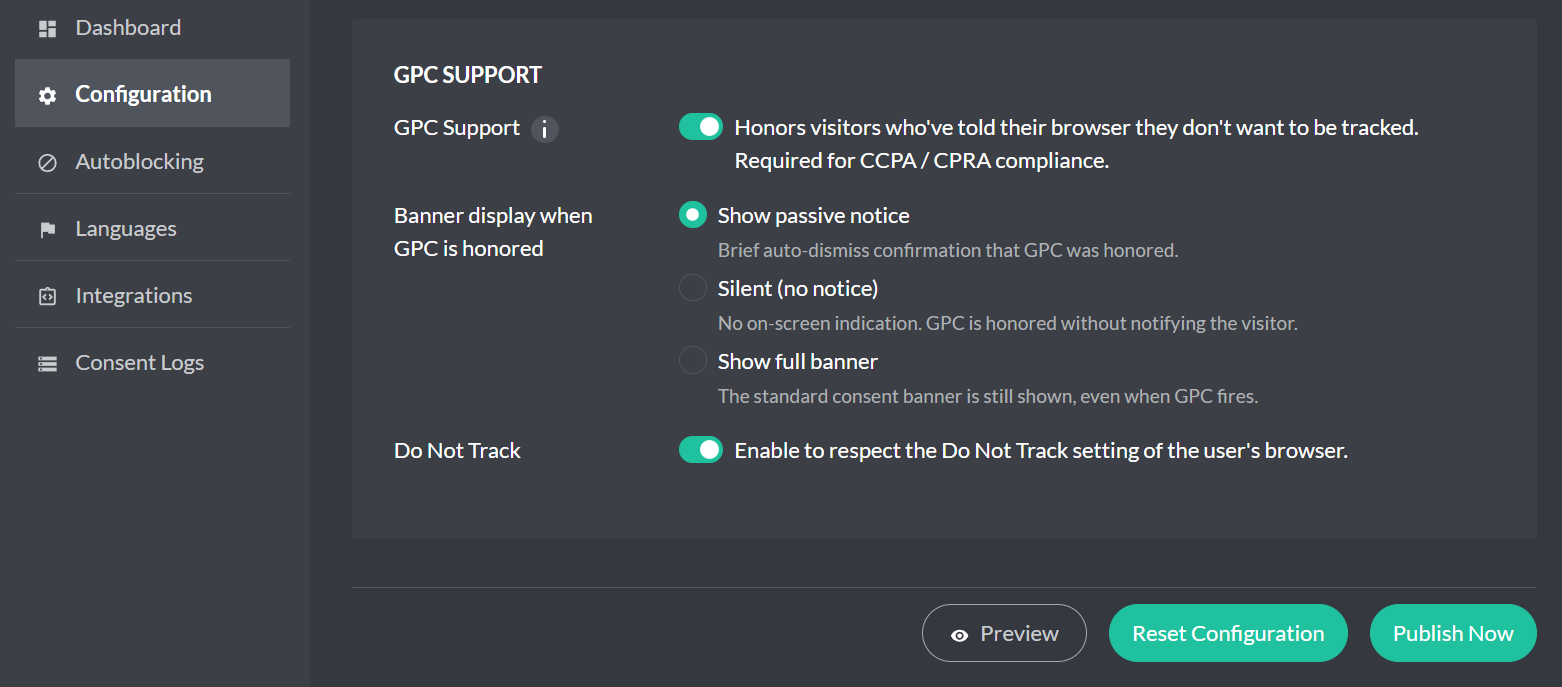
Banner display when GPC is honored: When GPC is honored, the portal offers three modes: Show passive notice (a brief confirmation, shown once and closing by itself, that GPC was honored), Silent (no notice) (GPC is honored with no on-screen indication), or Show full banner (the standard consent banner still appears). Set the mode in the Consent Signals panel (Cookie Consent → Laws, languages & signals → Consent signals), or on Configuration → Consent Signals. The GPC support card on the Cookie Consent tab only displays the mode.
How to activate — use either place. The screenshot is the Cookie Compliance dashboard.
Cookie Compliance dashboard
- Open app.hu-manity.co and go to Configuration → Consent Signals.
- Turn on GPC Support. Do Not Track is on the same card; leave it as it is unless you mean to change it too. Geolocation is on Configuration → Laws, not this page.
- Click Publish Now. On a WordPress site, open the plugin and click Pull latest settings so the site picks the change up immediately.
WordPress plugin
- In WordPress admin, open Compliance.
- Go to the Cookie Consent tab.
- On the Laws, languages & signals card, click Consent signals to open the Consent Signals panel.
- Under Browser Signals, select Global Privacy Control.
- Toggle it on and click Apply.
What this toggle does:
- When a browser sends a Global Privacy Control (GPC) signal, Cookie Compliance treats it as an opt-out preference and starts with a conservative default: anything mapped to sale/sharing or cross-site tracking (typically Ad Personalization) is off until the visitor explicitly opts in.
- In Show full banner mode the banner appears as usual, with your Default Consent Level preselected (Classic engine; the New engine preselects nothing), and scripts stay blocked until the visitor chooses (subject to the limits above). In Show passive notice mode no banner is shown: a brief notice appears and a Private choice is recorded. In full banner mode, visitors can choose Private, Balanced, or Personalized—their selection takes precedence and is enforced by Autoblocking. Silent (no notice) honors GPC without showing a banner.
- Your configured consent modes (Google Consent Mode, Meta (Facebook) Consent Mode, Microsoft Consent Mode) read the same resulting consent state; nothing “leaks” before consent.
What it does not do:
- It doesn’t change your Purpose Categories; it only applies your existing mapping under a present session.
- It doesn’t silently accept or reject on the user’s behalf. Silent (no notice) hides the on-screen notice; the other two modes still show a confirmation or the standard banner.
Quick terminology
Global Privacy Control (GPC) — a browser signal indicating a user’s opt-out preference for sale/sharing and cross-site tracking.
Purpose Categories — the “why” behind a service (e.g., Basic Operations, Site Optimization, Content Personalization, Ad Personalization).
Access Levels — visitor-friendly presets over those purposes (Private, Balanced, Personalized).
Do Not Sell/Share — a U.S. opt-out concept some policies expose to visitors.