
Microsoft Consent Mode
|
Applies to: WordPress Plugin + Admin Portal WP Admin: Protection tab > Consent Modes (Professional plan)
|
Microsoft Consent Mode is a privacy feature for Microsoft tags that adjusts how data is stored and sent based on a visitor’s consent. It applies to:
- Microsoft Advertising UET (Universal Event Tracking) — ads/conversion tracking
- Microsoft Invest/Curate/Monetize pixels — advertising stack pixels
- Microsoft Clarity — session analytics
With Consent Mode, tags change behavior according to specified consent signals. For UET, the key control is the ad_storage setting: granted (allow ad cookies) or denied (no ad cookies). For Clarity, the Consent API v2 uses ad_Storage and analytics_Storage to enable or restrict cookies and session tracking.
Why it matters
Microsoft Advertising requires consent signals for visits from the EEA, UK and Switzerland starting May 5, 2025; failing to provide them can impact measurement and remarketing. Microsoft Clarity announced enforcement of consent signal requirements for the same regions on October 31, 2025.
How it works
Consent signals & tag behavior – UET (Microsoft Advertising)
Control consent with the ad_storage parameter:
- granted → UET may read/write cookies for advertising and conversions.
- denied → UET does not read/write first-party ad cookies; third-party access remains restricted.
Set consent with default and update commands via window.uetq .
Clarity (Session analytics)
Use Consent API v2:
- ad_Storage and analytics_Storage (each: granted/denied).
When denied, Clarity runs in a no-consent mode without setting its cookies (_clck , _clsk ). When granted, it sets cookies and sessions persist across pages. Clarity can also honor Google Consent Mode signals if you use them.
Mapping to Compliance by Hu-manity.co categories
Compliance by Hu-manity.co lets you map your purpose categories (e.g., Ad Personalisation, Site Optimisation/Analytics) to Microsoft consent signals. When a visitor saves preferences, Compliance by Hu-manity.co sends the appropriate grant/deny values to Microsoft tags automatically.
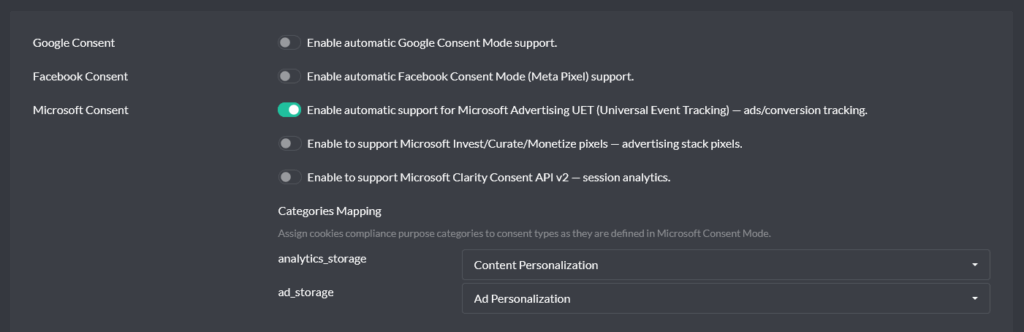
Compliance by Hu-manity.co & Microsoft Consent Mode
Microsoft Consent Mode requires the Professional plan. Free-plan users will see this feature locked in the Protection tab with an upgrade prompt.
Compliance by Hu-manity.co integrates with Microsoft Consent Mode so you don’t need to hand-code most of this.
How to enable
- In WordPress admin, open Compliance by Hu-manity.co.
- Go to the Protection tab.
- Click Consent Modes.
- Select Microsoft, toggle it Enabled, and click Apply.
With Autoblocking enabled (recommended)
Compliance by Hu-manity.co blocks non-essential third-party code by default for GDPR-style regions. When you enable Microsoft Consent Mode, Compliance by Hu-manity.co permits Microsoft scripts to load early only to receive consent signals, while it sets storage to denied until the user consents. After consent, Compliance by Hu-manity.co updates signals and the tags adjust behavior accordingly. (See also our Google Consent Mode article for the same pattern.)
With Autoblocking disabled
Compliance by Hu-manity.co does not pre-block non-essential scripts. If you don’t set a safe default, UET may assume ad_storage: granted . Always send a default denied before user choice, then update after consent.
FAQs
Is Microsoft Consent Mode mandatory?
Microsoft Advertising requires user consent signals for EEA/UK/CH traffic starting May 5, 2025 (missing signals affect measurement/remarketing). Microsoft Clarity will enforce consent signals from October 31, 2025.
Does Microsoft model conversions like Google’s “advanced” mode?
Microsoft’s approach focuses on basic consent signaling (ad_storage) and does not currently offer Google-style conversion modeling; expect reduced attribution without consent. (Industry analyses.)
Which tags are covered?
UET (Microsoft Advertising), Universal Pixel/Segment/Conversion pixels in Microsoft Invest/Curate/Monetize, and Clarity.